Attend in person
To successfully enroll in and complete a General Programming course, students must meet certain prerequisites and have access to the necessary tools and resources. Below are the key Course Requirements:
✅ Basic Computer Literacy – Understanding file management, installing software, and using the internet.
✅ Mathematical Logic – Basic algebra, logic, and problem-solving skills.
✅ Fundamentals of Algorithms (recommended) – Knowledge of flowcharts and logical thinking is helpful.
Optional but Beneficial:
✅ Code Editor / IDE – Any of the following:
✅ Compilers & Interpreters – Based on the programming language:
✅ Version Control System (optional but useful)
✅ Database System (if covered in the course)
✅ Other Required Software
✅ Minimum System Requirements
✅ Reliable Internet Connection – Required for accessing online materials, coding environments, and collaboration tools.
✅ Online Learning Platforms – (if applicable)
✅ Assignments & Coding Exercises – Regular hands-on practice.
✅ Quizzes & Exams – Theory and practical assessments.
✅ Final Project / Capstone Project – A small real-world programming project.
✅ Active Participation – Engaging in discussions, group projects, and coding challenges.
Data structures are ways to organize, store, and manage data efficiently in programming. They are essential for developing efficient algorithms and optimizing performance in software applications.
Data is arranged sequentially, and elements are accessed in a specific order.
✅ Arrays – Fixed-size collection of elements stored in contiguous memory.
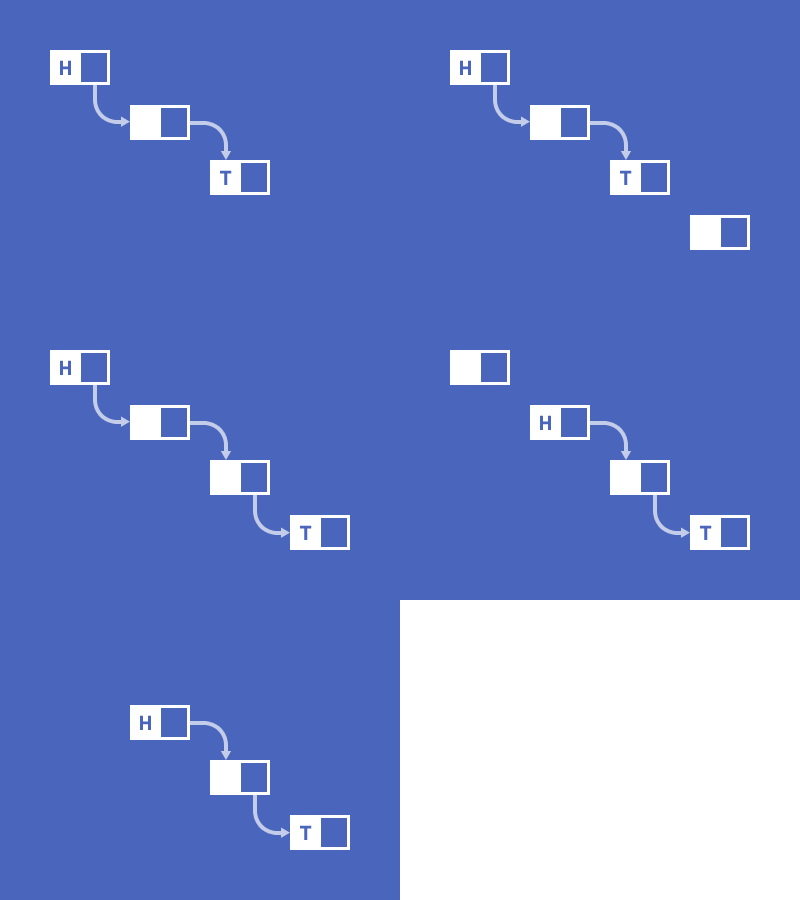
int arr[5] = {1, 2, 3, 4, 5};✅ Linked Lists – A collection of nodes where each node contains data and a reference to the next node.
struct Node { int data; Node* next; };✅ Stacks (LIFO – Last In, First Out)
push(), pop(), peek()✅ Queues (FIFO – First In, First Out)
Data is organized hierarchically or in an interconnected manner.
✅ Trees – A hierarchical structure with a root node and child nodes.
✅ Graphs – A set of nodes (vertices) connected by edges.
✅ Hash Tables (Hash Maps)
std::unordered_map in C++, dict in Python.✅ Trie (Prefix Tree)
✅ Heaps (Min Heap & Max Heap)
📌 Insertion, Deletion, Searching, Sorting, Traversal
Would you like a detailed explanation of a specific data structure or its implementation?
By the end of a General Programming course, students will develop a strong foundation in coding, problem-solving, and software development. Below are the key Course Outcomes (COs):
✅ Explain basic programming concepts such as variables, data types, operators, and control structures.
✅ Differentiate between various programming paradigms (procedural, object-oriented, functional).
✅ Apply logical thinking to design algorithms for solving computational problems.
✅ Implement and analyze key algorithms (sorting, searching, recursion).
✅ Use data structures (arrays, linked lists, stacks, queues, trees, graphs) effectively.
✅ Develop clean, structured, and well-documented code following best practices.
✅ Apply modularity and reusability principles in software design.
✅ Understand and follow different phases of software development (planning, coding, testing, deployment).
✅ Use version control systems (Git, GitHub) for managing code collaboration.
✅ Identify, analyze, and fix programming errors and bugs.
✅ Use debugging tools and exception handling to ensure code reliability.
✅ Interact with relational (SQL) and NoSQL databases to store and retrieve data.
✅ Perform file operations (reading, writing, manipulating CSV, JSON, and XML files).
✅ Implement core OOP principles: encapsulation, inheritance, polymorphism, and abstraction.
✅ Develop applications using classes and objects in OOP-based languages.
✅ Build basic applications, such as web, desktop, or mobile applications.
✅ Work with frameworks and libraries to enhance functionality.
✅ Gain introductory knowledge of APIs, networking, cloud computing, or cybersecurity.
✅ Explore automation, scripting, and integration with external systems.
✅ Work effectively in teams using agile methodologies and best software development practices.
✅ Communicate technical concepts clearly through documentation and presentations.
Students will demonstrate their understanding through:
✅ Hands-on coding assignments
✅ Algorithmic problem-solving exercises
✅ Mini-projects and final project development
✅ Quizzes, written exams, and presentations
Data Structures
No Review found
 Static
 Static